What Is a CDN, and Does Your Website Actually Need One? · HostingVotes
Guides· 6 min read
What Is a CDN, and Does Your Website Actually Need One?
A CDN serves copies of your files from servers near each visitor. How it works, what it can and can't fix, the caching mistakes to avoid and when to skip it.
Your website lives on a server in one place. Maybe that's Frankfurt, maybe Virginia. Every visitor, wherever they are, has to reach that one machine. For someone in the same country, that's quick. For someone on the other side of the world, every request makes a long round trip, and a page needs dozens of them.
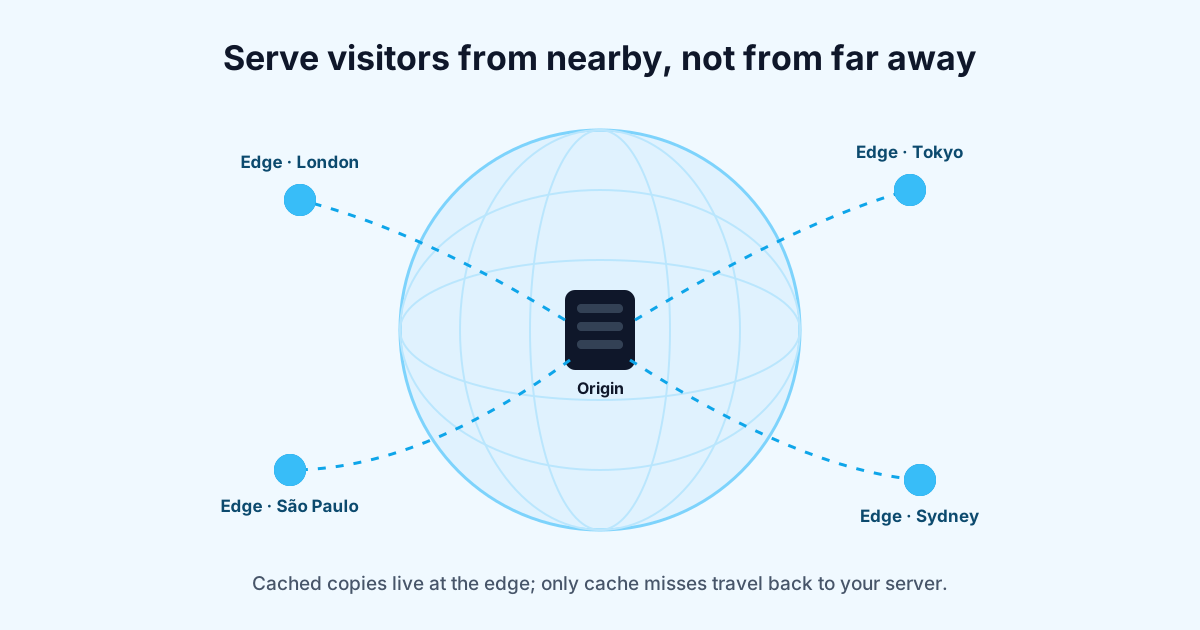
A content delivery network (CDN) fixes that by keeping copies of your files on servers spread around the world, and answering each visitor from one nearby.
How a CDN works
The server that holds your real site is called the origin. The CDN's servers are called edge servers, or points of presence, and there are usually many of them across continents.
When you put a CDN in front of your site, visitors no longer talk to your origin directly. Their requests go to the nearest edge. What happens next depends on whether that edge already has the file.
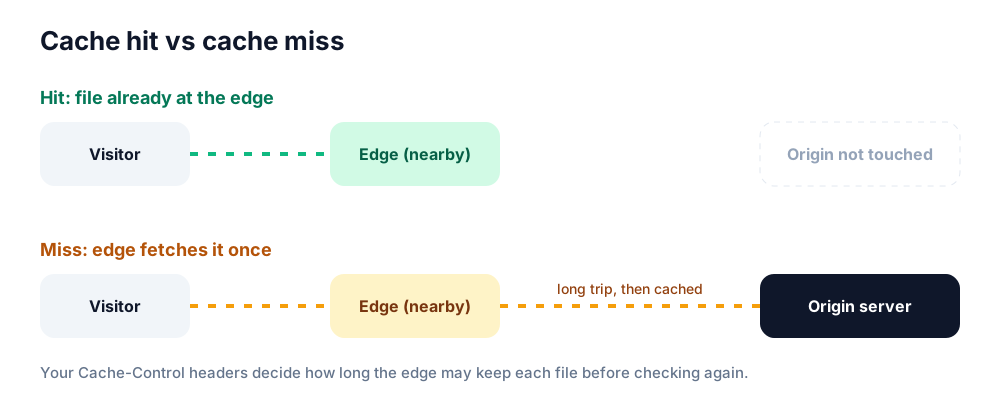
A cache hit never reaches your server. A miss makes one trip, then the copy is reused.
Cache hit: the edge has a fresh copy and sends it straight back. Your server isn't involved at all.
Cache miss: the edge fetches the file from your origin, sends it to the visitor and keeps a copy for the next person nearby.
The share of requests served from the edge is called the cache hit ratio. The higher it is, the faster your site feels and the less work your server does.
What a CDN is good at
Lower latency for far-away visitors. Images, CSS, JavaScript and fonts come from a nearby city instead of another continent.
Less load on your server.
Compare hosts the community actually votes for
Real customers rank providers by speed, support and value — no paid placements.
If the edge handles most file requests, your hosting plan has more room for the work only it can do, like running PHP and database queries.
Absorbing traffic spikes. A popular post or a sale sends the rush to the CDN, not your origin.
Extra protection. Many CDNs include DDoS mitigation and a web application firewall, and hide your origin's IP address.
Modern delivery features. HTTP/3, automatic compression and image resizing are often switched on with a toggle.
What a CDN won't fix
A CDN is not a cure for a slow site. It can't help with:
Slow server responses for uncached pages. If WordPress takes two seconds to build a page, visitors who miss the cache still wait two seconds. Fixing that is a hosting and caching job; our guide to speeding up WordPress covers it.
Heavy pages. Five megabytes of images is still five megabytes, just delivered from closer.
Slow JavaScript. If the page is slow because the browser is busy running scripts, the CDN can't help.
Downtime. If your origin is down, the CDN can only keep serving what it already has cached. Some CDNs can serve stale copies during outages, but dynamic pages and checkouts will still fail.
A good way to check whether a CDN would help is your time to first byte (TTFB) from different locations. Google suggests 0.8 seconds or less (web.dev). If TTFB is fine near your server but poor far away, a CDN is likely to help. If it's poor everywhere, fix the server first.
Caching static files vs caching whole pages
Most CDNs cache static files out of the box: images, stylesheets, scripts and fonts. These are the same for every visitor, so they're safe to cache.
Caching the HTML pages themselves is where the big speed gains are, because it removes the trip to your origin entirely. It's also where things go wrong. A cached page is the same for everyone, so you must never cache:
Pages for logged-in users, such as dashboards and account pages
Shopping carts and checkouts
Anything showing personal data
Most good setups cache HTML only for visitors without a login cookie, and skip caching for paths like /cart, /checkout and /wp-admin. If you turn on full-page caching, test it while logged in and logged out, in two different browsers.
Cache-Control: who decides how long files stay cached
Your server tells the CDN and browsers how long they may keep each file, using the Cache-Control header. Two common patterns:
# For files with a version or hash in the name, like app.3f9a2c.js
Cache-Control: public, max-age=31536000, immutable

# For HTML that changes often
Cache-Control: public, max-age=0, s-maxage=300
The first says "keep this for a year, it will never change". That's safe because a new version gets a new filename. The second tells browsers to always check again, but lets shared caches like a CDN keep the page for five minutes (s-maxage only applies to shared caches).
When you change a file that doesn't have a versioned name, you'll need to purge it from the CDN, or visitors keep seeing the old one until it expires. Most CDN dashboards and many WordPress plugins can purge automatically when you publish.
Do you actually need one?
You probably should use a CDN if:
Your visitors are spread across countries or continents
Your pages are image-heavy
You get sudden traffic spikes from social media, newsletters or sales
You want DDoS protection without managing it yourself
You can probably skip it for now if:
Your audience is local, and your server is in the same region
Your site is small and already fast
Your host already includes a CDN, which many managed hosts now do
Several CDNs have free plans that are fine for small sites, so cost is rarely the blocker. Complexity is. Every layer you add is another place for caching mistakes, and another dashboard to check when something looks wrong.
How to add a CDN without breaking things
Check what your host includes. Many managed WordPress hosts bundle a CDN, so turning it on can be one click.
Start with static files only. Get images, CSS and JS served from the edge, and check the site works.
Watch for mixed content and broken fonts. Fonts loaded from a different domain may need the right CORS headers.
Add page caching carefully, with logged-in users and carts excluded.
Measure before and after from a few locations, and keep an eye on the cache hit ratio.
If you move DNS to a CDN provider as part of the setup, the same care applies as when migrating to a new host: lower TTLs first and copy every record, including email.
FAQ
Does a CDN help SEO?
Indirectly. Search engines care about page experience, and a CDN can improve load times for distant visitors. It won't help rankings on its own if the content or the rest of the site is weak.
Is Cloudflare a CDN?
Yes. Cloudflare is one of the most widely used CDNs, and it also provides DNS, security and other services. Its setup is a little different from some CDNs because it usually becomes your DNS provider too.
Will a CDN make my site slower?
It can, if it's set up badly. A low cache hit ratio means most requests take an extra hop to the origin. Check your hit ratio after setup and adjust caching rules if it's low.
What's a "pull" CDN?
The most common kind. The CDN pulls files from your origin the first time someone asks for them, as in the cache miss diagram above. A "push" CDN needs you to upload files to it yourself.
Do I need a CDN for a site in one country?
Often not, if your server is in that country. Some still use one for the security features and to absorb traffic spikes.
HostingVotes
HostingVotes is a community-driven directory where real customers vote on and review web hosting, VPS, cloud and domain providers.