NVMe vs SSD Hosting: Does Faster Storage Actually Speed Up Your Site?
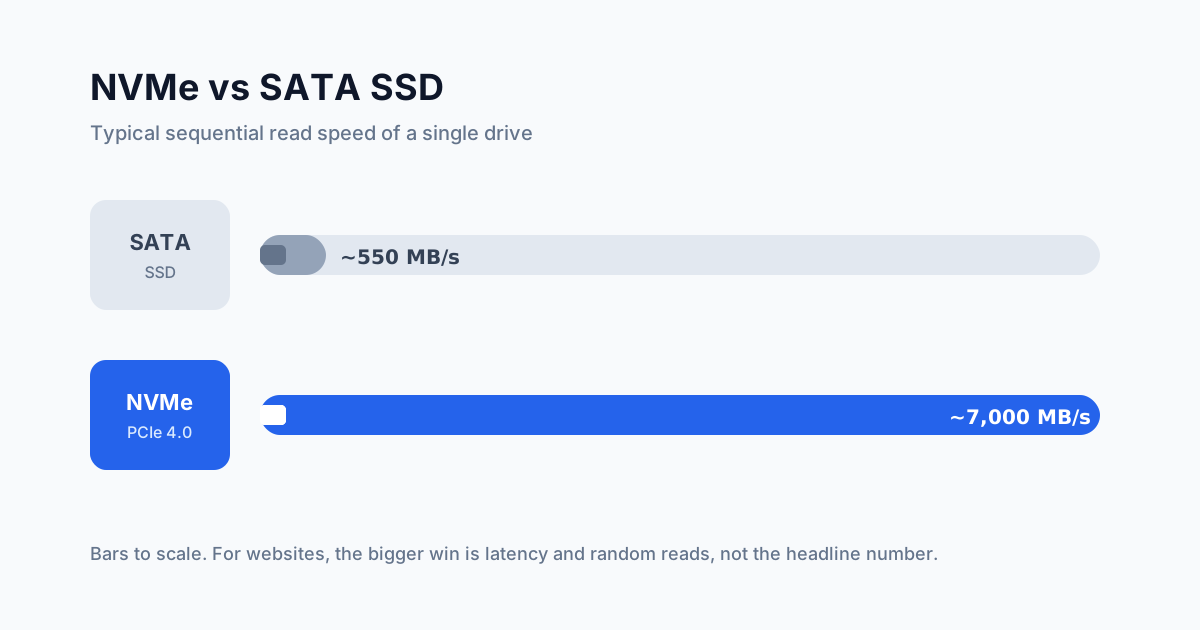
NVMe drives read up to about 12x faster than SATA SSDs on paper. Here's when that shows up on a real website, when it doesn't, and what to ask your host.
"NVMe storage" has become one of the most common lines on hosting plans, often with a claim that your site will be several times faster. The drives really are faster. Whether your website gets faster is a different question, and the honest answer is: sometimes, and usually by less than the marketing suggests.
Here's what the difference actually is, where it matters, and how to tell whether a plan's storage is any good.
What's the difference?
Both are solid-state drives. Neither has moving parts. The difference is how they connect to the rest of the computer.
SATA SSDs use the same connection that was designed for spinning hard drives. SATA III tops out at 6 Gb/s, which works out to roughly 550–600 MB/s in practice.
NVMe drives connect straight to the CPU over PCIe lanes. A PCIe 4.0 NVMe drive can read sequentially at around 7,000 MB/s (TechTarget).
That headline gap, more than ten times, is real. But for websites, two other differences matter more:
Latency. NVMe access latency is often quoted around 20 µs, against roughly 70–100 µs for SATA SSDs (IBM). Each individual read starts sooner.
Parallel work. SATA has a single command queue. The NVMe spec allows up to 65,535 queues, each with thousands of commands (IBM
Compare hosts the community actually votes for
Real customers rank providers by speed, support and value — no paid placements.
). That matters on a busy server where hundreds of requests hit the disk at once.
Why your site won't load 12x faster
Sequential speed is about reading one big file from start to finish. Websites rarely do that. A typical page request looks more like this:
The visitor's request crosses the network to your server.
The web server runs some code, such as PHP for WordPress.
The code asks the database for a handful of small records.
The server builds the HTML and sends it back.
Storage only plays a part in step 3, and maybe in loading code files in step 2. Even there, the operating system keeps frequently used files and database pages in RAM. Once your site has been running for a few minutes, many reads never touch the disk at all.
So for a small site with a page cache, moving from SATA to NVMe might shave a few milliseconds off a response that takes hundreds. That's real, but you won't feel it. Network distance, slow PHP and heavy images usually cost far more.
When NVMe does make a real difference
Faster storage starts to pay off when the disk becomes the bottleneck. That tends to happen with:
Databases bigger than the server's RAM. If the working set doesn't fit in memory, the database reads from disk constantly. Low latency and fast random reads help a lot here.
Busy, uncached dynamic sites. Online stores, membership sites and forums where most visitors are logged in can't serve cached HTML, so every visit runs queries.
Shared servers with many accounts. Hundreds of sites hitting the same disks benefit from NVMe's parallel queues. You feel this as fewer "slow moments" at busy times.
Backups, restores and imports. Copying large files, building search indexes and restoring backups all run noticeably faster.
Build and CI work. Installing packages and compiling code involves thousands of small files.
The number that matters more than "NVMe"
On shared hosting, the drive type tells you less than the limits placed on your account. Many shared hosts cap each account's disk throughput and the number of disk operations per second. A plan on very fast NVMe drives with a tight I/O cap can still feel slower than a well-provisioned SATA plan.
On a VPS or cloud server, ask a different question: is the storage local or network-attached? Cloud "block storage" is often reached over the network. It can be marketed as NVMe-backed, but every read takes a network round trip and is often capped by IOPS limits tied to your plan size.
Questions worth asking a host before you buy:
Is the storage local NVMe or network-attached?
What are the per-account I/O and IOPS limits?
Is storage in RAID, and what happens when a drive fails?
Are backups stored on separate hardware?
How to test it yourself
If you have SSH access, fio gives a fair picture of random-read performance, which is closer to how websites and databases use storage:
Look at the IOPS and latency figures, not just MB/s. Run it a few times at different hours. On shared or cloud platforms, results that swing wildly between runs usually mean noisy neighbours or tight limits.
For a web-level check, measure time to first byte (TTFB) before and after a move. Google's guidance treats 0.8 seconds or less as good (web.dev). If your TTFB is already low, storage isn't your problem.
So is NVMe worth paying extra for?
Today, NVMe is close to standard on new hardware, and many hosts no longer charge extra for it. If two plans cost the same, take the NVMe one. If the NVMe plan costs noticeably more, weigh it against what you'd get from spending that money on:
More RAM, so more of your database stays in memory.
A page cache or CDN, which skips the disk entirely for most visitors.
Better CPU, since PHP and database work are often CPU-bound.
For a small brochure site or blog, these usually matter more. For a large store or database-heavy app, fast local NVMe is worth having. Our guide to choosing web hosting covers the other specs worth checking, and don't forget to look at renewal prices before you commit.
FAQ
Is NVMe the same as SSD?
NVMe drives are SSDs. "SSD hosting" in plan descriptions usually means SATA SSDs, while "NVMe hosting" means SSDs that use the faster NVMe interface over PCIe.
Will NVMe improve my Core Web Vitals?
Only indirectly. Storage can lower server response time, which feeds into Largest Contentful Paint. But image sizes, scripts and caching usually have a much bigger effect on LCP, INP and CLS.
Is NVMe more reliable than SATA SSD?
Not inherently. Reliability depends on the drive model, its endurance rating and how the host sets it up. RAID and separate backups matter far more than the interface.
What about PCIe 5.0 drives?
PCIe 5.0 NVMe drives are faster again on paper. For website hosting, the same rule applies: once storage stops being the bottleneck, faster drives stop helping.
Can a host claim NVMe if only the cache is NVMe?
Some setups use NVMe as a cache in front of slower storage. That's not necessarily bad, but it's worth asking exactly what "NVMe storage" means on a plan.