Guides· 6 min read
Domain Registrar vs Web Host: Why You Should Keep Them Separate
Your domain and your hosting are two different services. Why keeping them with separate companies protects your site, and how to move a domain away safely.
In this guide
When you buy hosting, the sign-up page often offers a "free domain for the first year". It's convenient: one account, one bill, everything set up for you. It's also how a lot of people end up with their domain name tied to a host they'd like to leave.
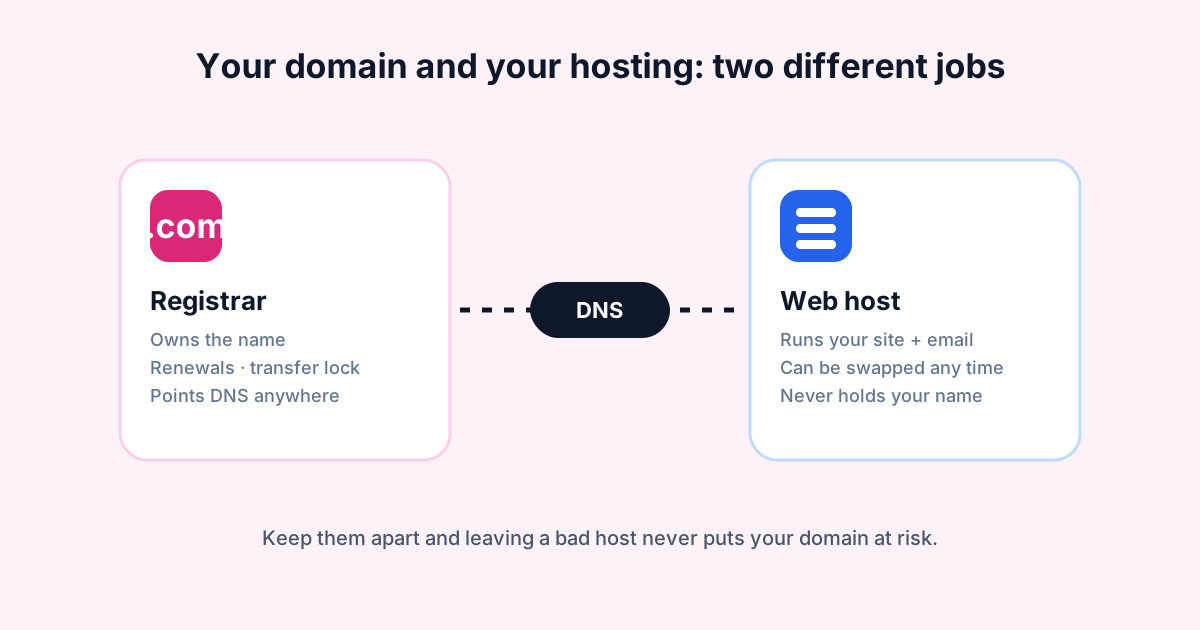
Your domain and your hosting are two separate things. Keeping them with separate companies costs a few minutes of setup, and it can save you a lot of trouble later.
What each one does
The domain registrar manages your rights to the name, like example.com. It handles renewals, ownership details and transfer locks. Most importantly, it controls which nameservers the domain uses, and the nameservers decide where your site and email live.
The web host runs the server that stores your files, runs your website and often handles your email. It never needs to own your domain. It just needs your domain to point at it.
DNS is the link between the two. It's the set of records that says "the website for this name is at this IP address" and "email goes to this mail server". DNS can be managed at your registrar, at your host or at a third party such as a CDN.
Why bundling them is risky
Having both with one company works fine, right up until you want to leave or something goes wrong.
Leaving becomes a two-step job
Moving a website between hosts is routine. Moving a domain at the same time adds a transfer, an authorization code and a waiting period, all while your site is mid-move. If the domain is elsewhere, switching hosts is just changing a few DNS records. Our migration guide shows how that looks in practice.
A suspended account can take your domain with it
If your hosting account is suspended for a billing dispute, a terms-of-service complaint or a security issue, you may lose access to the control panel where your domain lives. Your site is down
Compare hosts the community actually votes for
Real customers rank providers by speed, support and value — no paid placements.
Keep reading
How to Speed Up WordPress: The Hosting-Level Fixes That Actually Work
Most slow WordPress sites need server fixes, not another plugin. Page and object caching, PHP versions, OPcache, cron, images and how to measure the result.
GuidesWhat Is a CDN, and Does Your Website Actually Need One?
A CDN serves copies of your files from servers near each visitor. How it works, what it can and can't fix, the caching mistakes to avoid and when to skip it.
GuidesNVMe vs SSD Hosting: Does Faster Storage Actually Speed Up Your Site?
NVMe drives read up to about 12x faster than SATA SSDs on paper. Here's when that shows up on a real website, when it doesn't, and what to ask your host.